



DeltaMath Solver — Answers With Steps, In the Page
Delta Genie is the upcoming DeltaMath solver from GenieCheats — a Chrome tool that will read the exact problem on your screen, work out the answer, and show the steps that got there. It's still pre-launch, so this page earns its keep now: it explains what a real DeltaMath problem solver has to do, where photo apps and chatbots break, and why solving inside the page beats copying the problem out. When you're ready, join the waitlist for launch.
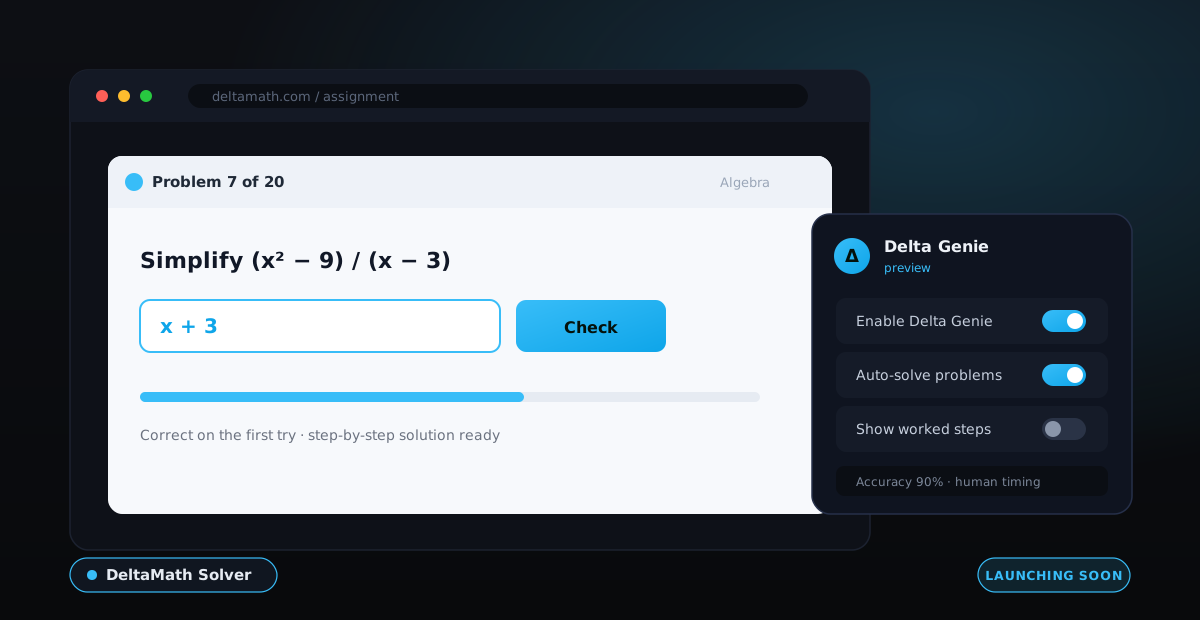
A useful DeltaMath solver has to solve the exact randomized problem on your screen and show the steps — not look up an answer that never existed. That's the gap Delta Genie is being built to fill: it reads your live problem inside the DeltaMath page and works it out in place.
- Photo apps and chatbots make you copy the problem out and copy the answer back — two places to slip up.
- A page-based solver can read graphs and word problems and enter the answer in DeltaMath's format.
- Delta Genie is in pre-release — join the waitlist for early access.
What a DeltaMath Solver Is
A DeltaMath solver is a tool that takes the exact problem you're staring at, does the math, and hands back the answer — and, if it's any good, the steps that produced it. That sounds obvious, but the definition matters more on DeltaMath than anywhere else, because the platform never shows two students the same numbers. Every question is built from a template and filled with values rolled just for you, so a solver can't reach for a stored result. It has to actually solve.
That single constraint separates a real DeltaMath problem solver from the thing most students settle for. Punching your numbers into a calculator is technically solving, but it's slow and it drops you back into the assignment holding a bare figure you still have to format. A search result that promises "the answers" is worse — it's pointing at a list that can't line up with your randomized version. The honest job of a solver here is narrow and specific: read the problem in front of you, compute its answer, and give you something you can trust and reproduce.
The best version of that job also respects where the problem lives. Your DeltaMath question isn't a photograph or a paragraph you pasted somewhere — it's a live element on a page, complete with a graph, an answer box, and a format the grader expects. A solver that understands that context can do far more than spit out a number, which is exactly the design that Delta Genie is being built around.
The Three Ways Students Solve DeltaMath Now
Before any extension existed, students found three do-it-yourself routes to a DeltaMath answer. Each one works often enough to feel viable and fails often enough to waste an evening. Here's what each actually does and where it quietly falls apart:
Retype into a calculator
You copy your numbers into a graphing calculator or an online tool and read off the result. It's reliable for a clean equation, but you're the courier — one mistyped sign and the whole answer is wrong, and it does nothing for graphs, proofs, or word problems.
Photo-math apps
Point a phone at the screen and let the app read the equation. Great for a printed line of algebra, but DeltaMath's drag-and-drop boxes, multi-part prompts, and buried word-problem values confuse the camera, and you still hand-copy the answer back.
AI chatbots
Paste the problem into a chatbot and ask for the answer. It reasons well on standard skills, but it can't see your graph, invents values when the prompt is vague, and has no idea what format DeltaMath's box will accept.
The common thread is that all three treat the problem as something you carry out of DeltaMath, solve elsewhere, and carry back. Every one of those trips is a fresh chance to transcribe a number wrong or return the answer in a shape the grader rejects. That handoff is the real weakness — and it's the first thing a page-based solver removes.
Solving Inside the Page vs Copying the Problem Out
There's a bigger difference than it first appears between a solver that reads your problem where it lives and one that makes you copy it somewhere else. Copying the problem out introduces two failure points that have nothing to do with math: reading your version wrong on the way out, and typing the answer wrong on the way back. Most "the calculator said the right thing but I still got it wrong" moments happen in that round trip, not in the arithmetic.
Solving inside the page collapses that round trip to nothing. When the tool reads the live problem directly, it sees the same negative sign, the same graph coordinates, and the same word-problem values you do — no camera guessing, no paste that drops a term. And when it produces the answer, it can place it straight into the box in the form the grader expects instead of leaving you to translate a decimal into the fraction DeltaMath wanted.
That's the whole philosophy behind an in-page solver. It isn't just more convenient; it's more accurate, because it deletes the two steps where students lose correct answers to format and transcription. For the broader picture of why "the answers" can't be looked up at all, our DeltaMath answers guide walks through the randomization in detail.
How a Solver Handles Each Problem Type
DeltaMath is not one kind of question, and a solver that only handles printed equations covers maybe half of what an assignment throws at you. A genuine DeltaMath math solver has to read the whole problem, whatever shape it takes. Here's what each common type actually demands:
- Equations: the solver has to isolate the variable and return the result simplified and ordered the way DeltaMath checks, not just a raw decimal.
- Graphs: it has to read the plotted points or the curve straight from the page, since a photo of a graph tells a solver almost nothing about the underlying values.
- Word problems: it has to pull the numbers out of the sentences and figure out which operation the scenario is asking for before any math happens.
- Systems: it has to track two or more equations at once and return every part of the solution set in the order and format the answer boxes expect.
- Functions: it has to evaluate, compose, or transform functions and write the result as the expression DeltaMath wants, carets and all, rather than a plotted point.
Notice how many of these break a camera or a chatbot: anything with a graph, anything multi-part, anything where the numbers hide in prose. Reading the problem from the page instead of from a screenshot is what lets a solver cover the whole spread instead of the easy quarter.
Just the Answer vs Step-by-Step
It's tempting to think you only want the answer — one number, one box, done. But a solver that shows nothing but the final value leaves you exposed in the one place it matters most: the test. DeltaMath practice is usually rehearsal for a graded assessment where no extension exists, and if all you ever saw was the answer, you never learned the move that produced it.
Worked steps fix that in two ways. First, they let you sanity-check the result — if the steps make sense and land on the value, you can trust it, and if they don't, you catch the error before it costs you the mark. Second, they're the part that transfers. The answer to your randomized problem is useless to anyone else and useless to you next week, but the method behind it is exactly what the test will ask you to reproduce.
This is why a good DeltaMath solver should be judged on its steps, not just its accuracy. Getting the right number quickly is table stakes; showing the reasoning is what turns a shortcut into something you actually keep. Delta Genie is being built to surface the working, so the tool doubles as a study aid instead of a black box that hands you a digit.
How Delta Genie Solves
Delta Genie runs on the same engine as MemGenie, our live Membean extension, adapted for the way DeltaMath poses problems. Rather than sending you off to a calculator, it reads the live question on your screen and solves that exact version in place. When it launches, three steps get it running:
Add the extension
Install Delta Genie from the Chrome Web Store in about half a minute. It will run on Chrome, Edge, and Brave. This step goes live at launch — join the waitlist to be first in line.
Open the assignment
Log into DeltaMath and open your assignment as usual. Delta Genie recognizes the page and reads the current problem — your randomized numbers, any graph, the answer boxes, and the format each one expects.
Set accuracy & timing
Choose how often it should land the right answer and how long it should pause between problems, so the run paces like real work instead of a perfect instant streak. Drag the sliders below to preview the planned controls:
Accuracy Settings
Timing Settings
Delta Genie will solve about 90% correct and wait around 10s per problem — brisk, but paced enough that the session reads as real work.
Accuracy You Control
The instinct with any solver is to want it perfect and instant — every problem right, no waiting. On DeltaMath that instinct backfires, because a flawless 100 turned in faster than anyone could read the questions is the single loudest signal that something automated was involved. A solver you can't dial back isn't a feature; it's a liability.
That's why adjustable accuracy sits at the center of Delta Genie's design rather than being an afterthought. You decide how often it lands the correct answer, so a run can include the occasional natural miss instead of an inhuman clean sweep. Paired with a timing control that spaces the answers out, the result is a session that looks like a student working through practice — because in every way that shows up on the activity log, that's what it resembles.
The point isn't to prove a tool can hit a perfect score in seconds; anything can do that badly. The point is a solver that blends into the work you'd have turned in anyway. If you want the deeper argument for why realistic pacing beats raw speed on this platform, the DeltaMath hack explainer digs into how the activity tracking actually works.
Solver Coverage by Subject
DeltaMath runs across most of the middle- and high-school math sequence, and a solver is only as useful as the range of courses it can actually handle. Here's how a full-coverage DeltaMath math solver should behave across the six subjects students ask about most:
Algebra
Linear and quadratic equations, factoring, and systems. The solver returns solution sets and expressions simplified the way the grader checks, which is where hand-copied answers usually slip.
Geometry
Angles, area and volume, and transformations. A solver has to respect units and rounding and hand back coordinate answers in the exact ordered-pair format the box shows.
Precalculus
Polynomials, logarithms, sequences, and the unit circle. Exact-value results with radicals and fractions are the trap here, and formatting them correctly is half the work.
Trigonometry
Right-triangle ratios, identities, and sine and cosine graphs. The solver has to know whether the box wants radians or degrees, the classic wrong-format miss even on a right number.
Calculus
Limits, derivatives, and integrals. Answers are usually expressions, so the challenge is the simplified form and the constant of integration written the way DeltaMath expects.
Statistics
Mean and spread, probability, and distributions. Rounding rules and decimal-versus-percent formatting decide whether a correct calculation is accepted or bounced.
Delta Genie vs Photomath vs Mathway vs ChatGPT
Plenty of tools can solve a math problem. The question is how many of them can solve your DeltaMath problem, in the page, in the right format. Here's how the planned Delta Genie approach stacks up against the three solvers students reach for most:
| Photomath | Mathway | ChatGPT | Delta Genie | |
|---|---|---|---|---|
| Solves your exact randomized version | Sometimes | You retype it | You paste it | Yes |
| Works inside the DeltaMath page | No | No | No | Yes |
| Reads graphs & word problems | Rarely | No | Text only | Yes |
| Enters the answer in DeltaMath's format | No | No | No | Yes |
| Shows the working steps | Yes | Paywalled | Yes | Yes |
| Adjustable accuracy & pacing | No | No | No | Yes |
Photomath and Mathway are strong at a clean printed equation and little else on DeltaMath's graphs and drag boxes. ChatGPT reasons well but can't see your page or place the answer. Delta Genie is designed to combine the reliability of solving your real version with the convenience of doing it in place and the safety of pacing you control.
DeltaMath Solver FAQ
What is a DeltaMath solver? A tool that takes the specific problem in front of you, works it out, and returns the answer — ideally with steps. Because the numbers are randomized per student, it has to solve your version rather than look anything up.
Can a DeltaMath problem solver show the steps? It should. A bare answer fills one box, but worked steps let you check the result and reproduce the method on a test. Delta Genie is designed to show the working, not just the value.
Do photo math apps work on DeltaMath? Only sometimes. They read a clean printed equation but stumble on graphs, drag-and-drop boxes, multi-part questions, and word problems — and they never enter the answer for you.
Is a browser solver better than a phone app? For DeltaMath, yes. A browser tool reads the live page directly instead of guessing from a camera, so it handles graphs and formatting a phone photo can't.
Will Delta Genie enter the answer in DeltaMath's format? That's the design goal — reduce the fraction, use a caret for exponents, format the ordered pair — so a correct value reads as correct instead of failing on format.
Does a solver handle graphs and word problems? A page-aware one can read the graph data and the sentence values straight from the assignment, which is exactly where photo apps and chatbots fall down.
How is a solver different from an answer key? An answer key is a fixed list; it can't exist on DeltaMath because every problem is randomized. A solver computes the answer to the one on your screen. Our DeltaMath answers guide covers why.
Can I control how accurate the solver is? Yes. Delta Genie is built with adjustable accuracy and timing so a run doesn't look like a flawless instant bot. You choose how often it's right and how long it waits.
Why does perfect accuracy backfire? DeltaMath logs time, attempts, and activity. A spotless 100 in ninety seconds stands out, which is why a dialable solver matters — see the DeltaMath hack breakdown.
Which subjects does the solver cover? Algebra, geometry, precalculus, trigonometry, calculus, and statistics — the main DeltaMath sequence, graphs and word problems included.
Can the solver enter multi-part answers? A page-based tool can place each part in the right box in the right order, which is the design intent behind Delta Genie.
Is there a free version? Pricing follows the GenieCheats plans — see pricing. Waitlist members get launch-day discounts.
Is Delta Genie affiliated with DeltaMath? No. It's an independent GenieCheats tool and is not affiliated with DeltaMath in any way.
When does the Delta Genie solver launch? It's in pre-release now. Join the waitlist for early access and launch pricing.
Get the Solver First
Delta Genie is the DeltaMath solver that reads the exact problem on your screen, works out the answer, shows the steps, enters it in the format the box expects, and paces the run like a person. There's no answer key to hunt and no photo app that survives a graph — but there is a solver coming that handles the one in front of you, end to end. It's launching soon, so put your name on the waitlist and you'll be first in line the day it hits the Chrome Web Store.