
The Membean Cheat That Doesn't Get You Caught (2026)
The real question with a Membean cheat isn't whether it works, it's whether you get caught. MemGenie answers sessions the way a real student would, so nothing looks off.

Enable Extension
Switch it on and MemGenie sits quietly on the Membean tab until you need it.
Turn On Automation
This hands the session over, but the pacing below still decides how safe it looks.
Auto-Solve Quizzes
Quizzes are where sloppy cheats slip up, so this handles them the same careful way.
Accuracy
The single most important dial — miss a few on purpose so a perfect score never flags you.
Timing
Spread answers out so your minutes read as real study time, not an instant sweep.
Live Dashboard
See how many questions have been handled without you touching the keyboard.
- 1
Enable Extension
Switch it on and MemGenie sits quietly on the Membean tab until you need it.
- 2
Turn On Automation
This hands the session over, but the pacing controls still decide how safe it looks.
- 3
Auto-Solve Quizzes
Quizzes are where sloppy cheats slip up, so this handles them the same careful way.
- 4
Accuracy
The single most important dial — miss a few on purpose so a perfect score never flags you.
- 5
Timing
Spread answers out so your minutes read as real study time, not an instant sweep.
- 6
Live Dashboard
See how many questions have been handled without you touching the keyboard.
Most Membean cheats get caught because they answer too fast and too perfectly. MemGenie is a Chrome extension that answers Membean the way a real student would, with accuracy and timing you control so the session doesn't trip Membean's detection.
- Installs in about 30 seconds on Chrome, Edge, or Brave.
Will You Get Caught Cheating on Membean?
Honest answer: it depends entirely on how the Membean cheat behaves, not on whether you used one. Teachers rarely watch a session live. What flags you is the data Membean logs afterward — how long you spent, how fast each answer came in, and how often you were right. A cheat that answers everything instantly and perfectly leaves a trail that looks nothing like studying, and that's usually what gets a student pulled aside. The goal isn't just to finish the session. It's to finish it in a way that reads as normal.
How Membean Actually Detects Cheating
Membean was built to notice when the effort isn't real. A few signals it pays attention to:
- Dubious minutes: if your logged time doesn't match the work done, those minutes can get thrown out — so a "10-minute" session that took 40 seconds counts for nothing.
- Answers that are too fast: responses that land quicker than anyone could read the question stand out immediately.
- Scores that are too perfect: real students miss words, especially new ones. A clean 100% every single night is a pattern, not a coincidence.
- Identical rhythm: the same delay on every question looks automated, because it is.
None of these need a human to catch. They're the kind of thing a system checks automatically, which is exactly why a careless cheat gets flagged before anyone even looks.
Why Most Membean Cheats Get Caught
The free scripts floating around Reddit and GitHub almost all make the same mistake: they answer as fast as the code can run, at 100% accuracy, with no variation. That's the worst possible profile. Here's the usual lineup and where each one falls down:
- Copy-paste answer keys: Membean shuffles words per student, so someone else's list rarely matches yours and you end up guessing anyway.
- Free auto-answer scripts: they fire instantly and never miss, which is the single clearest signal of automation.
- ChatGPT in another tab: slow, breaks on in-context questions, and you're still typing every answer by hand.
- Just clicking through fast: racks up dubious minutes and a suspicious pace, so the work often doesn't even count.
How to Cheat Membean Safely with MemGenie
MemGenie takes the opposite approach. It runs inside your Membean session and hands you the controls that decide how the activity looks. Three steps:
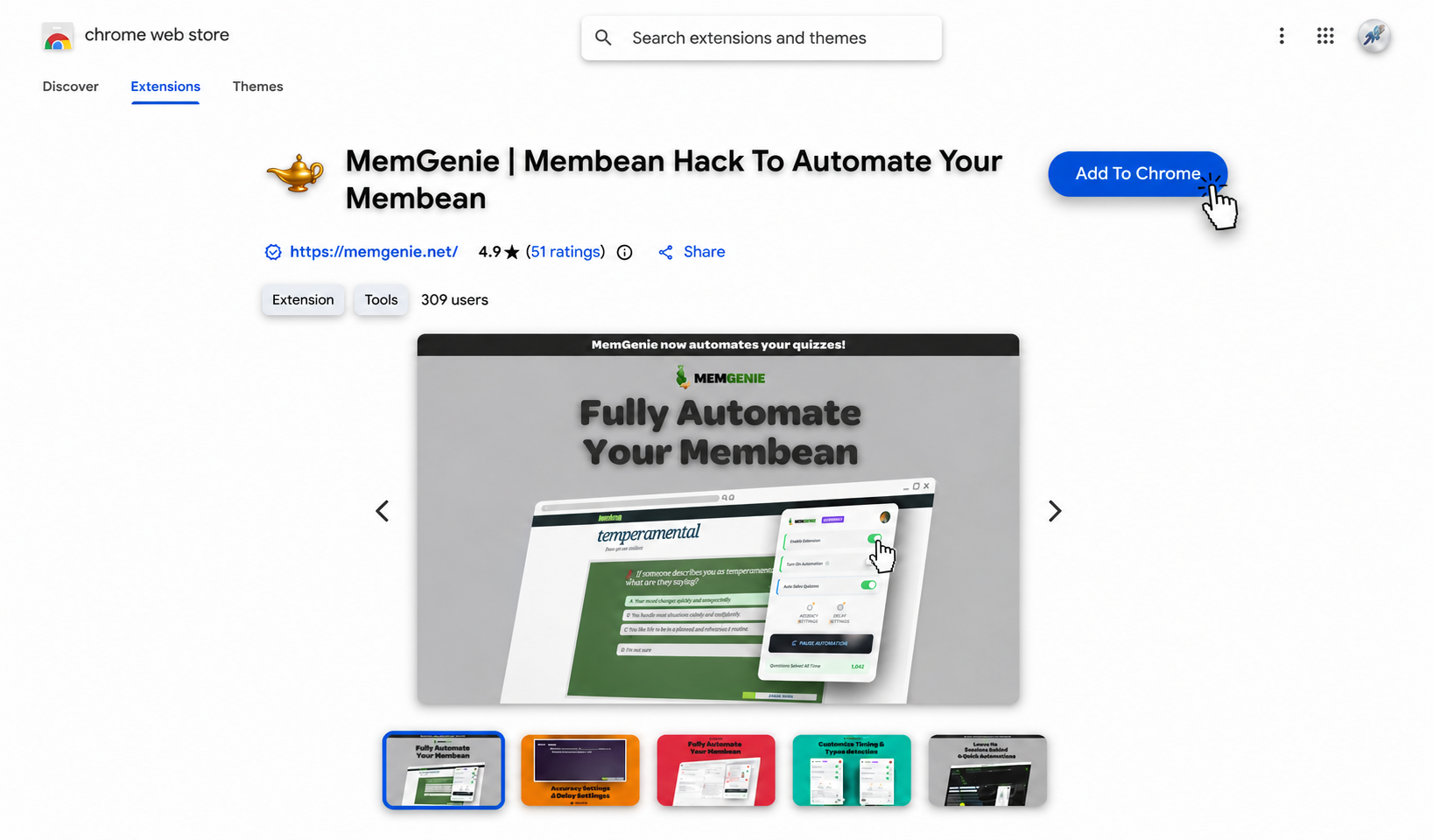
Install the MemGenie extension
Add MemGenie from the Chrome Web Store. It installs in about 30 seconds and runs on Chrome, Edge, and Brave.
Open your Membean session
Log in and start your training or quiz like you normally would. MemGenie recognizes the Membean page and gets ready on its own — nothing to configure mid-session.
Set your accuracy and timing, then let it run
This is the part that keeps you safe. Pick an accuracy level that isn't a flawless 100%, add a realistic delay between answers, and let MemGenie work while your session reads like genuine study time. Drag the sliders below — these are the real MemGenie controls:
Accuracy Settings
Timing Settings
MemGenie will answer about 90% correct and wait around 15s per question — natural enough that Membean reads it as real work.
The Controls That Keep You Under the Radar
Custom Accuracy
Set it below perfect on purpose. A believable miss rate is what separates a real session from a bot.
Answer Delays
Put real seconds between answers so your logged minutes hold up instead of counting as dubious.
Human-Like Typing
Types with pauses and small variation rather than dropping a whole answer in one instant.
Quiz Mode
Handles Membean quizzes with the same careful pacing, not just the nightly training.
Auto Highlights
Marks the right choice so you can follow along and stay in the loop on what it's doing.
Chrome Extension
Lives in your browser after a one-time install, ready the moment you open Membean.
Staying Safe: What Actually Keeps You Off the Flag List
If you take one thing from this page, make it this: the safest cheat is the one that looks the most boring. A few habits go a long way.
- Never run 100%: keep accuracy realistic so a perfect record doesn't do the flagging for Membean.
- Leave real delays on: honest timing keeps your minutes from getting written off as dubious.
- Let it type, don't paste: human-like typing avoids the instant-fill pattern scripts are known for.
- Vary night to night: a session that's a little different each time reads far more like a person than a fixed routine.
- Stay updated: MemGenie is patched when Membean changes, so it doesn't break loudly like abandoned scripts.
What Students Say About Staying Undetected
"I was honestly scared of getting caught, so I kept my accuracy around 80 and left the delays on. Whole semester, not a single flag. That was the part that sold me."
— Ethan K., High School Senior"A free script got my roommate flagged in like two days because it answered everything instantly. MemGenie actually paces itself, so mine just looks like I did the work."
— Maya T., SophomoreMembean Cheat FAQ
Will I get caught using a Membean cheat? Only if it behaves suspiciously. Membean flags sessions that are too fast or too perfect, so MemGenie lets you keep accuracy and timing realistic and stays undetected by looking like normal work.
How does Membean know if you cheated? It looks at logged time versus work done, answer speed, and accuracy patterns. Instant answers and flawless scores are the biggest tells, and dubious minutes get discarded automatically.
What's the safest way to cheat on Membean? Keep it boring. Use a believable accuracy under 100%, leave real delays between answers, and let the tool type instead of paste — which is exactly how MemGenie is set up.
Does MemGenie work on quizzes too? Yes. Quiz mode covers Membean quizzes with the same careful pacing when you get your Membean quiz answers, not just the nightly training.
Is there a free Membean cheat that's safe? Free scripts are usually the ones that get patched or flagged first because they cut every corner. MemGenie is maintained with real controls — see pricing for current plans.
Get Started With MemGenie Today
MemGenie gets your Membean sessions done without the part that gets people caught. Set your accuracy, keep your timing honest, and let it work while the session reads like you sat down and did it. Grab it and stop gambling on sketchy scripts.